10 Best Free Project Management Tools for Small Teams in 2026
 Pankaj Sharma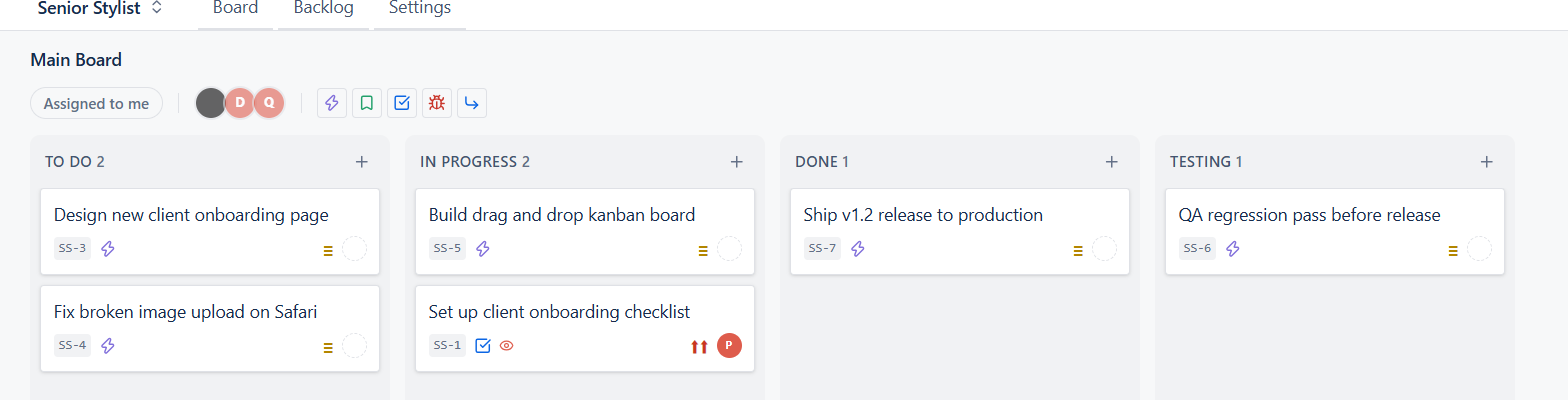
If you run a small agency, a two-person dev shop, or you are freelancing and juggling three clients at once, you already know the problem. Most project management tools are built for big companies with big budgets. You end up paying per person, per month, for features you will never touch.
So here is a simple, honest list of free project management tools worth looking at in 2026. No hype, just what each one is actually good for, and where it falls short.
1. Projevio
This is us, so take it with a pinch of salt, but here is what we actually built and why. We kept hearing the same complaint from small agencies and freelancers: either the free tool is too basic, or the powerful tool is too expensive once you add your whole team and your clients.
So Projevio works on a simple kanban board. You get columns like To Do, In Progress, Testing, and Done, and your team just drags a card across as work moves forward. Say a developer picks up a bug fix, the card moves from To Do to In Progress. Once the code is ready, it moves to Testing so your QA person or the client can check it. Once it is approved, it moves to Done. No training needed, everyone gets it in five minutes.
You can also set up Components for each project, so a bug in the "Payments" part of your app or a task under the "Onboarding" module of a client site stays organised and easy to filter, instead of everything sitting in one long messy list.
The biggest difference, honestly, is that we do not charge per user. You can invite your whole team, your freelancers, and even your clients without watching a seat counter go up. And right now, the first 500 teams that sign up get it free, forever, not just a 14 day trial.
2. Trello
Trello is the tool most people think of first. It is simple, it is fast, and the free plan is genuinely usable for personal task tracking or a very small team. The catch is that Trello is basically just cards in lists. There is no real workflow, no client view, and once your team crosses a certain size, you start feeling the limits of the free plan pretty quickly.
3. Asana
Asana looks polished and works well for marketing teams. But the free plan caps how many people you can add, and a lot of the useful stuff (timelines, custom fields, approvals) sits behind a paywall. For a five-person agency, you will hit that wall faster than you expect.
4. Jira
Jira is powerful, no doubt. But it was built for large software teams with a dedicated admin managing workflows, permissions, and schemes. For a small team, Jira feels like driving a truck to buy groceries. It works, but it is more than you need, and the learning curve alone will eat your first week.
5. ClickUp
ClickUp tries to do everything, which is both its strength and its weakness. The free plan is generous on paper, but the interface has so many options that new team members (or clients) get lost in it. Good if you have time to configure it. Not great if you want to start working today.
6. Notion
Notion is more of a flexible workspace than a project management tool. You can build a board in it, sure, but you are building it from scratch every time. It works if someone on your team enjoys setting up databases. Most small teams do not have that person.
7. Monday.com
Monday.com has a nice visual style and a free plan for very small teams. But it is priced per seat, and it adds up fast once you cross a handful of users. Also, most of the automation and reporting features are locked behind higher tiers.
8. Wrike
Wrike is solid for mid-size teams but the free plan is quite basic, more of a trial taste than something you can run a real client project on long term.
9. Airtable
Airtable is a spreadsheet with superpowers. It can be turned into a project tracker, but again, you are the one turning it into one. It is a great tool for someone who likes building systems. It is not a project management tool out of the box.
10. Bitrix24
Bitrix24 packs in a lot, CRM, chat, tasks, all in one place. The free plan allows a decent number of users, but the interface feels crowded, and most small teams only need a fraction of what it offers.
So which one should you pick?
If your team is one or two people and you just need a to-do list, Trello is fine. If you are a small agency managing real client work, need your team and your clients on the same page, and do not want to pay per seat, that is exactly the gap we built Projevio to fill.
Try it, it takes two minutes to set up your first board, and you can judge for yourself.
Written by
Pankaj Sharma